

In the digital era, where data is the new currency, securing sensitive information has become paramount for businesses of all sizes. Microsoft Power Suite, known for its robust capabilities in enhancing productivity and decision-making, is also a focal point for data security. This blog post will explore the best practices for ensuring data security and compliance within the Power Suite ecosystem, highlighting key strategies that can safeguard your organization’s most valuable assets.
Understanding the Power Suite Security Landscape
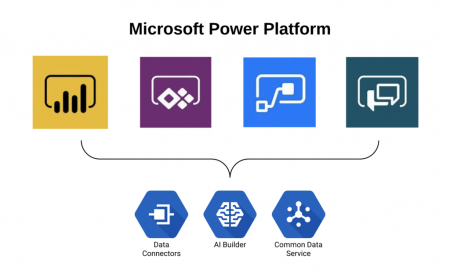
Before diving into best practices, it’s essential to understand the security landscape of the Power Suite, which includes Power BI, PowerApps, and Power Automate. Each of these tools has unique security features and potential vulnerabilities. Power BI deals with data visualization and reporting, PowerApps in app development, and Power Automate in workflow automation. The interconnected nature of these tools necessitates a comprehensive approach to security.
Best Practices for Data Security in Power Suite
1. Implement Role-Based Access Control (RBAC)
RBAC is critical in regulating access to sensitive data within Power Suite. By assigning roles and permissions based on job functions, you can ensure that employees only have access to the data necessary for their roles. This minimizes the risk of data breaches from both external attacks and internal misuse.
2. Regular Audits and Compliance Checks
Conducting regular audits is crucial for maintaining data security. These audits should review who has access to what data, how data is being used, and whether any security policies need updating. Compliance checks are equally important, especially for organizations governed by regulations like GDPR, HIPAA, or CCPA. Ensure your Power Suite usage complies with these laws to avoid hefty fines and legal issues.
3. Utilize Data Encryption
Encryption transforms readable data into an encoded format, which can only be read or processed after it’s been decrypted. Encrypting data in Power Suite, both at rest and in transit, adds an essential layer of security, protecting your data from unauthorized access and cyber threats.
4. Data Loss Prevention (DLP) Policies
Implementing DLP policies in Power Automate and PowerApps helps prevent sensitive information from being shared or used inappropriately. These policies can restrict the flow of data to unauthorized sources and alert administrators of any potential breaches
5. Secure Integration with External Data Sources
When integrating external data sources with Power Suite tools, ensure that these sources are secure and reliable. Use gateways and API management tools to securely fetch data from external databases, and always validate the security credentials of third-party services.
6. Training and Awareness Programs
Human error is a significant factor in data breaches. Regular training and awareness programs for your team can significantly reduce this risk. Educate your employees about the importance of data security, common cyber threats, and safe practices when using Power Suite tools.
7. Backup and Recovery Plans
Having a robust backup and recovery plan is vital. In case of a data breach or loss, you should be able to quickly restore your data to minimize downtime and damage. Regularly backup your Power Suite data and test your recovery plans to ensure they work effectively.
8. Monitor and Respond to Security Threats
Continuous monitoring of your Power Suite environment can help detect and respond to security threats in real-time. Use Power BI’s audit logs and security dashboards to track user activities and identify suspicious patterns.
9. Secure App Development in PowerApps
When developing apps with PowerApps, follow secure coding practices. Validate user input, use secure connections, and test your apps for vulnerabilities. Also, regularly update your apps to patch any security holes.
10. Keep Your Power Suite Environment Updated
Microsoft frequently releases updates for Power Suite tools that include security enhancements. Keeping your environment updated ensures that you benefit from the latest security features and fixes.
Conclusion
In today’s data-driven world, the security of your digital assets is as crucial as their functionality. By implementing these best practices, you can significantly enhance the security posture of your Power Suite environment. It’s about creating a culture of security within your organization, where every member understands the importance of protecting data and is equipped to do so.
Remember, data security is not a one-time effort but a continuous process of improvement and adaptation to emerging threats. By staying vigilant and proactive, you can ensure that your organization’s data remains secure and compliant.
Learn More
Interested in further strengthening your organization’s data security in Power Suite? Third Quartile offers expert guidance and solutions tailored to your unique needs. Visit Third Quartile to learn more about our services and how we can help you safeguard your most critical digital assets.